
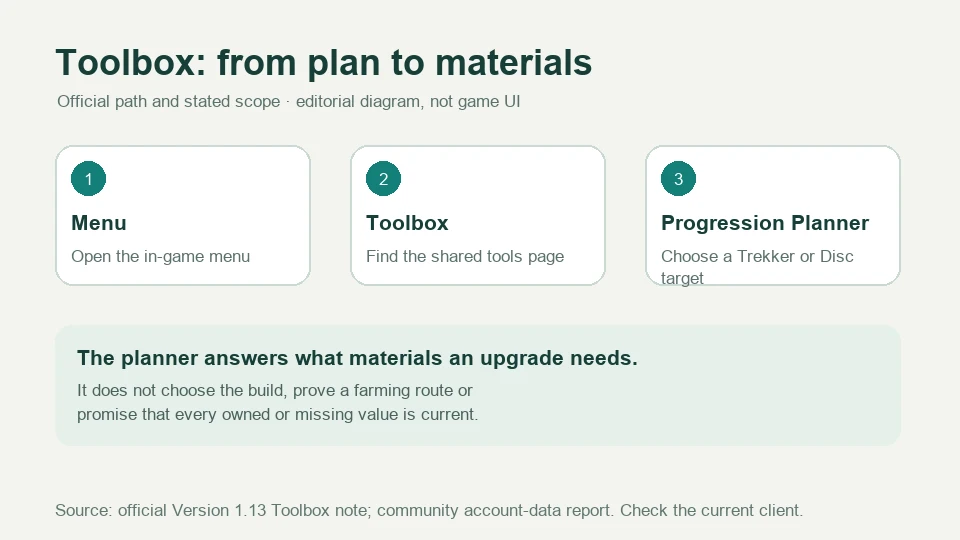
Open the in-game Menu, choose Toolbox, then open Progression Planner. The official Version 1.13 note says the planner calculates materials needed to upgrade Trekkers and Runic Discs; the same Toolbox includes a Profile page for Main Story Progress and completed Achievements. A player report from the same feature says the calculator uses account data and shows both owned and missing materials. The official note does not enumerate every input or guarantee live inventory synchronization, so confirm the displayed fields in your client.
Global Version 1.13 feature documentation and a community report from a July 2026 session. Exact current menu labels, fields, refresh behavior and output layout may have changed by Version 2.0; they were not verified through a first-party current UI capture.
Sources checked:
On this page
Where the official planner lives
- Open the game’s Menu.
- Choose Toolbox.
- Select Progression Planner for Trekker or Runic Disc upgrade materials, or Profile for story and Achievement progress.
The official Version 1.13 note supplies this path directly. If your client uses an updated label, look for the Toolbox entry in Menu and use the planner’s own title rather than a third-party URL.
This is a web-backed in-game tool. One player reported that the in-game entry opens another page, so a network or embedded-browser failure can occur independently of the game account. Check the Toolbox again after connectivity returns before entering data into an unofficial planner.
What it is confirmed to calculate
Official and community-supported planner scope
Scroll the table sideways on a narrow screen.
| Area | Confirmed function | Important boundary |
|---|---|---|
| Trekker upgrades | Official note: calculate materials needed to upgrade Trekkers | It does not publish every selectable level, Skill or Potential path |
| Runic Disc upgrades | Official note: calculate materials needed to upgrade Runic Discs | It does not establish a best-in-slot choice |
| Inventory comparison | A player report says it uses own-account data and shows owned versus missing materials | The official note does not specify refresh timing or every account-data source |
| Profile | Official note: Main Story Progress and completed Achievements | Not a complete account audit or combat history |
The planner answers “what materials are needed for this target?” It does not replace farming routes or tell you which Trekker or Disc to build. Use the output as the material side of a decision you make with the team plan and the build guide.
A practical planning loop
- Choose one target Trekker or Runic Disc and the intended upgrade level in the planner.
- Read the required material list and the owned-versus-needed comparison presented by your client.
- Check that the target is part of a working team. Do not spend on a duplicate or an unused side character merely to clear the list.
- Map the missing materials to available Trials, event shops or the farming guide. Recheck the plan after claiming rewards.
- Keep a copy of the target and material shortfall before an event ends; changing banners and event currencies can make an old screenshot stale.
The plan is conditional on the target you enter. Changing a level, character form or Disc tier changes the requirement list. Confirm the exact level before spending a scarce selector or event currency.
Separate the plan, the inventory and the real gate
Three different questions
Scroll the table sideways on a narrow screen.
| Question | Use the planner? | Also verify |
|---|---|---|
| What materials would this upgrade need? | Yes: enter the intended target | The current game version and exact level are the same as the plan |
| How much do I already own? | Yes, if the inventory comparison is displayed | Refresh or reopen before a spending decision; do not trust an old screenshot |
| Where can I farm the shortage? | No: planner does not prove a route | Open the relevant Trial/event and the farming guide |
| Is this upgrade worth it for my team? | No: the planner does not rank builds | Check the team interaction and a supported build |
If the player report’s owned-versus-missing view differs from your client, do not treat the third-party description as a guarantee of automatic inventory sync. Open the live planner and compare the numbers before spending.
What this guide does not replace
- It does not reproduce a complete material table or calculate every future level.
- It does not recommend a pull, selector or build from the material count alone.
- It does not claim the planner knows a live inventory update before the client displays it.
- It does not make an unofficial calculator equivalent to the in-game page.
For current domain, account and client paths, use the PC download guide and the official Global channels. For a lost reward or account-specific discrepancy, use support; a planner mismatch alone does not prove a purchase failure.
Sources & scope
These notes organize the sources below. Creator observations belong to their authors; this site has not performed the gameplay tests. A source check is separate from a game update or publication date.
Browse this guide category · All guides